What's new

We ship what our
clients ask for.

This page is the record. Every item below traces to a request raised by a client in a review session, with the date they asked and the date it went live. Nothing here came from an internal roadmap meeting.

27
Improvements since August
6
Product areas advanced
2
Calendar providers
1
Connected experience
Release · September 2026

From finding the right person to meeting them

Smarter matching, easier coordination, and more control for every community.

Connections & mentoring

Better matches — with reasons members can trust

Mentor, alumni, and mentee recommendations now focus on meaningful expertise instead of filler words. Members see cleaner match reasons, and older shortlists are brought up to the same standard automatically.

The mentorship journey now continues beyond the introduction with follow-through prompts, private coordination, and clearer recovery when a step needs another try. Nearby Alumni introductions also stay private until a member's own discovery settings are ready.
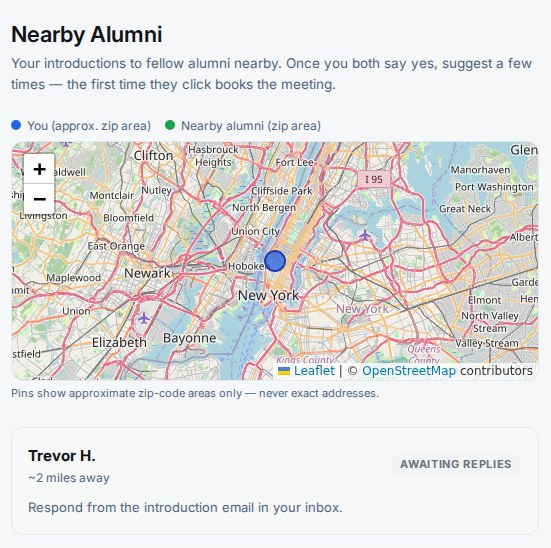
Members · Nearby Alumni and Mentoring
Nearby Alumni page with privacy-safe location matching
Calendar coordination

Availability in. Confirmed plans out.

Members can connect Google Calendar or Microsoft Outlook so meeting suggestions respect their real availability without exposing calendar details to other members. Confirmed gatherings can be saved to a member's calendar, and later changes stay synchronized.

Calendar selection and saving are more reliable, event descriptions can show useful link previews, and new-event handling keeps the event experience current from invitation through attendance.
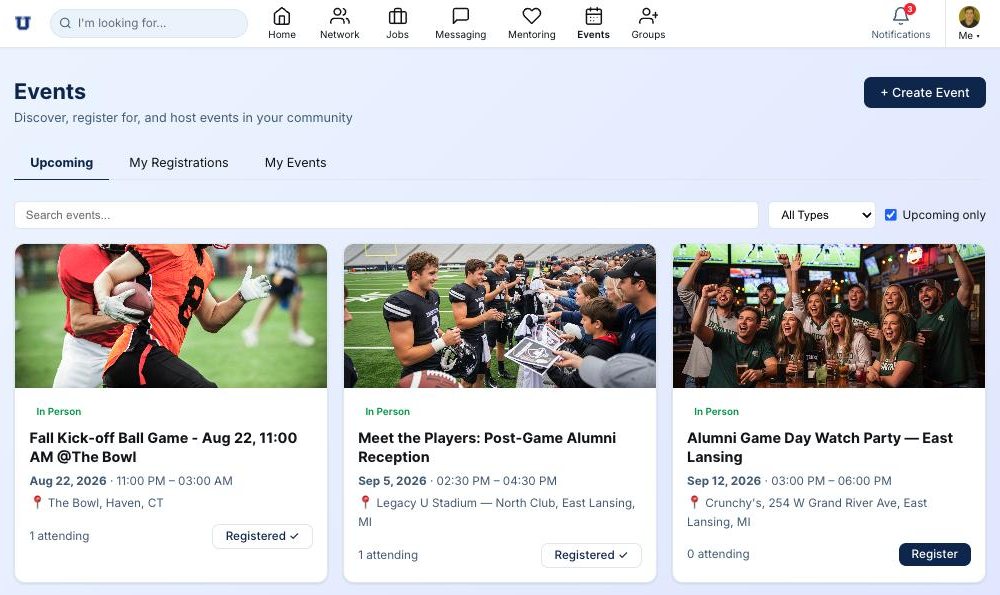
Members · Events, Nearby Alumni, and calendar settings
Events experience with registration and calendar coordination
Posts & notifications

Schedule it now. Change it before it sends.

Tenant-wide notifications can now be scheduled for a future date, edited while they are waiting, or cancelled permanently. The recipient list is preserved at scheduling time, so a delayed notification goes to exactly the audience the author reviewed.

Rich posts keep their formatting and inline previews when edited. Link previews no longer multiply or disappear during an ordinary correction, and scheduled content remains manageable without deleting and starting over.
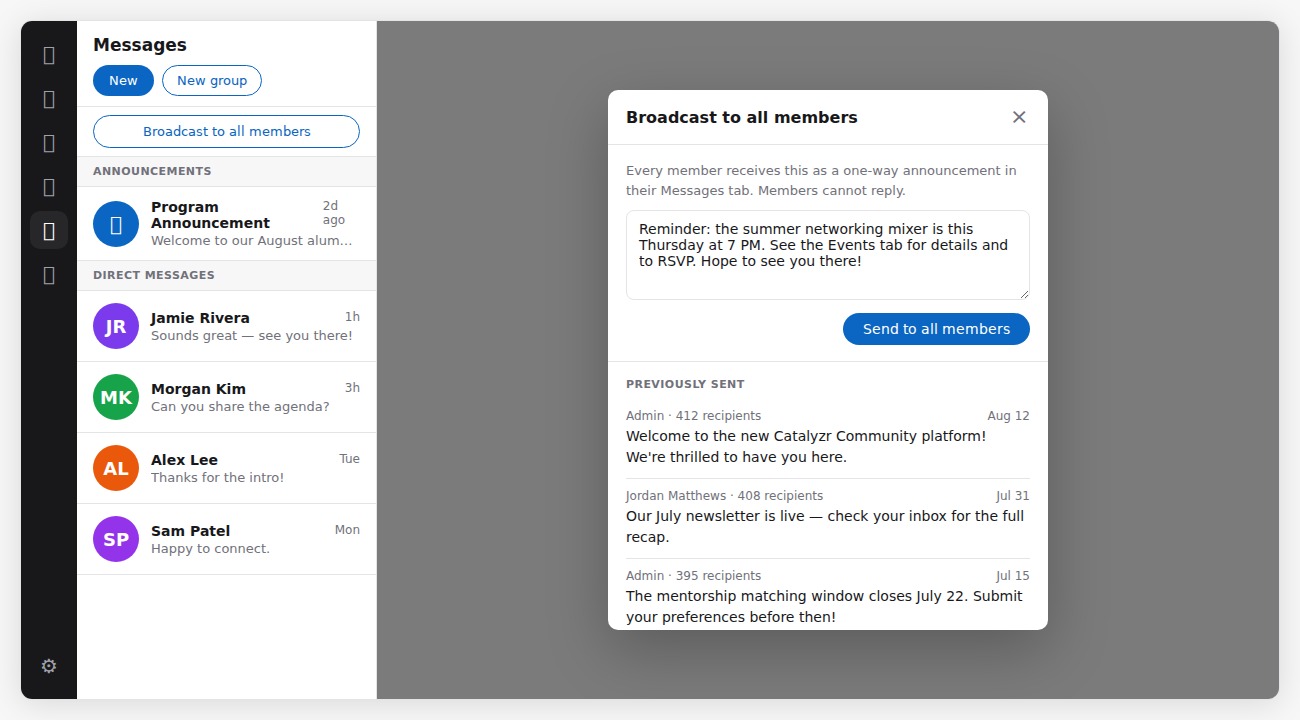
Client Admins and authorized Managers · Messaging and the Feed
Messaging broadcast controls for community-wide notifications
Preferences & recommendations

Useful recommendations without giving up control

Event attendance can improve recommendations without revealing private attendance history. Members get private, explainable controls for what they want help finding, while event coordination stays visible only to the people involved.

Email preferences now follow the member within each community. Unrelated account changes no longer overwrite application-status choices, members can resubscribe deliberately, and blocked members cannot trigger email or push notifications.
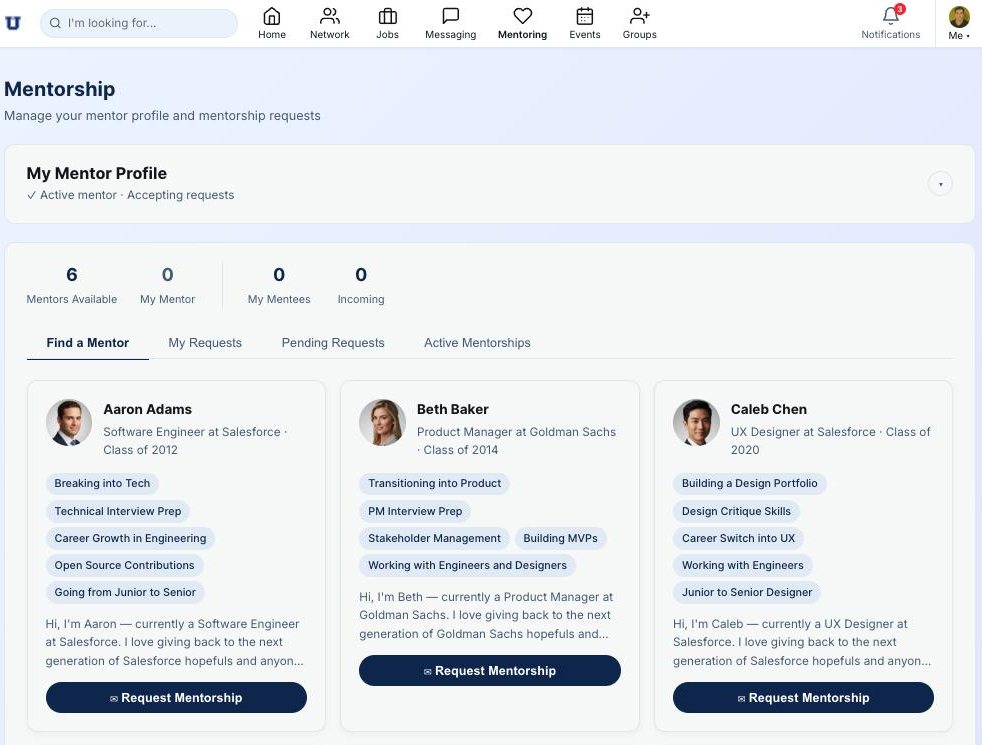
All members · Account, Notifications, Events, and Mentoring
Mentoring experience with private recommendation preferences

Also in this release

Donation refunds
Authorized tenant and system administrators can issue refunds through a secure, auditable workflow.
Custom role assignments
Communities can actively assign their own tenant roles while preserving the permissions and review controls behind them.
LinkedIn profile refresh
Administrators can re-run LinkedIn enrichment and see durable delivery outcomes instead of wondering whether a request completed.
Search counts after blocking
People, company, job, and content counts remain accurate after a member blocks someone.
Mobile navigation that stays in sync
Tab highlights and browser history now follow the page a member is actually viewing.
Reliable avatar fallbacks
When a reader's profile image cannot load, their initials appear instead of a broken image.
Community colors everywhere
Navigation accents and map pins now follow each community's selected theme.
Keyboard-friendly action menus
Post and message menus support keyboard navigation and return focus to the right place when they close.
Mobile comment deletion
Members and moderators can reliably remove comments from a phone-sized screen.
Clearer application updates
Status-change notifications use readable labels, and content authors receive an email when a removed group or event item is reinstated.
Moderation that stays removed
Deleted event comments no longer reappear, and malformed reports cannot expose or act on content from another community.
Broadcast access clarity
Manager and member notification controls use consistent names and respect each community's configured access.
Release · August 2026

The agent that gets alumni in the same room

The first Catalyzr AI agent, shipped with the controls to run it.

Nearby Alumni

Two alumni, two miles apart, finally meet

The Connections Agent scans nightly for opted-in members who live near each other and proposes an in-person introduction. When both say yes, it suggests times and the first tap books the meeting — no back-and-forth.

The new Nearby Alumni page shows every introduction on a privacy-safe map. Pins mark approximate zip-code areas only — never exact addresses — and members are invisible until they personally opt in. Only a name is shared, plus class year if it's on the profile.

When both members accept, the agent connects them in the app automatically — no second step, no admin involvement. The introduction is already a live connection by the time they check their inbox.

Members find it via the map icon in the nav bar · Opt-in and radius live on the Nearby Alumni page
Nearby Alumni page with the privacy-safe zip-area map
AI Agents

One switch, clearly labeled, admin-owned

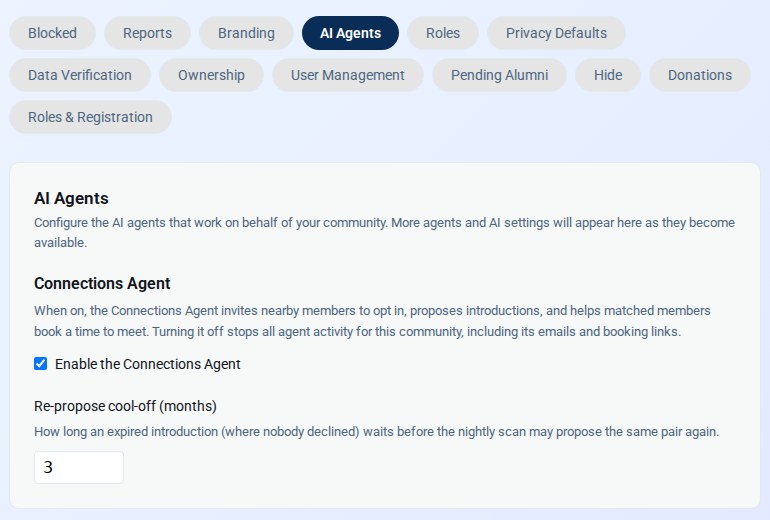
Client Settings gained a dedicated AI Agents tab — the home for every agent we ship. The Connections Agent lives there today: one switch to turn it on, and a cool-off control for how long the agent waits before re-proposing an expired introduction.

Every community ships with the agent off. Nothing scans, nothing emails, and no member is discoverable until a Client Admin decides to turn it on.

Client Admins only · Client Settings → AI Agents
The AI Agents tab in Client Settings
Manager broadcasts

The people running the program can reach the membership

Managers — the staff who handle day-to-day operations — can now send a broadcast to all members without needing a Client Admin to do it for them. The button appears in Messaging the moment the capability is on.

Client Admins decide whether to grant it. A new toggle in Client Settings → Roles & Capabilities turns Manager broadcast access on or off per community. It ships off by default, so nothing changes for existing communities until an admin chooses to enable it.

Client Admins only · Client Settings → Roles & Capabilities → Send broadcasts
Broadcast panel open in Messaging
Account settings

Everything about you, one place

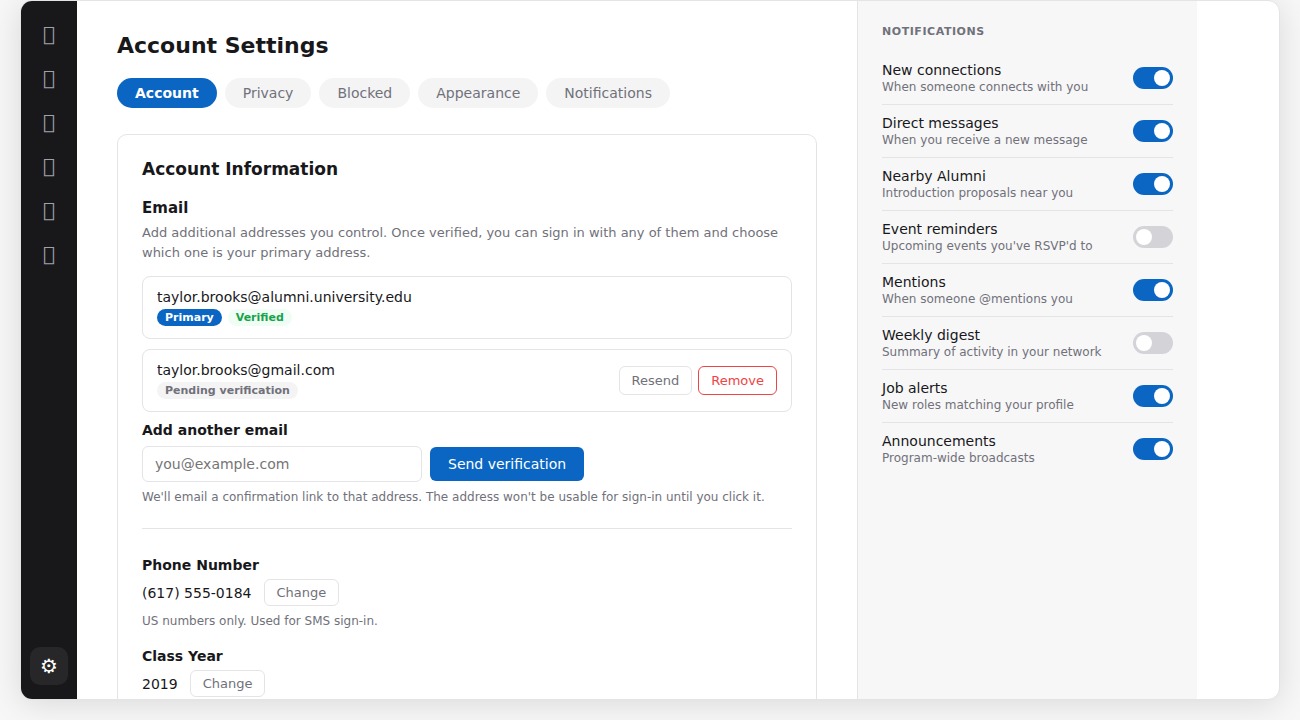
The Account tab now handles email addresses, class year, and zip code alongside the existing profile fields — no more switching tabs to find something. Channel notification preferences moved to Account → Notifications, where they sit next to the digest and mention controls.

The standalone Email tab is gone. Class year and zip update the same record as the profile editor, so there is no version to reconcile.

All members · Account in the app menu
Account settings tab showing email, class year, and zip fields

Also in this release

Nearby Alumni nav icon
A map icon appears in the navigation bar for opted-in members when the Connections Agent is on — one tap to the Nearby page from anywhere in the app.
Auto-connect on introduction
When both members accept a proximity introduction, a live Connection is created instantly. No extra step for either of them.
Scheduled-post timezone fix
Admins who are not in the community's home timezone could no longer schedule posts in the future. The time picker now anchors to the device's local time.
Mobile legibility
Forms no longer trigger the phone's auto-zoom, so pages stay put while you type.
Defect fixes
Assorted small fixes and reliability improvements across the platform.
Release · July 2026

Twelve requests, ten days

Raised July 20 and July 23. In production by July 30.

Scheduled posts

Build a game weekend on Wednesday

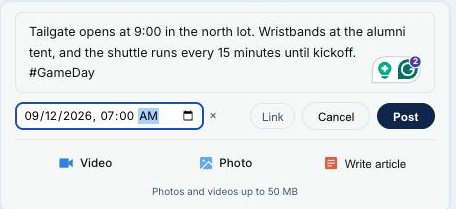
Write the post now, set the date and time, and it publishes itself. Tailgate details at 7:00 Saturday morning, a kickoff reminder at 10:00, trivia Monday. All of it queued in one sitting.

Times follow the community's time zone rather than the device you are holding, so a staffer travelling with the team does not have to convert anything. Anything queued can still be edited or cancelled before it sends.

Requested by Client Admin · Delivered July 28
Composing a scheduled post
Directory integrity

The directory shows people who actually joined

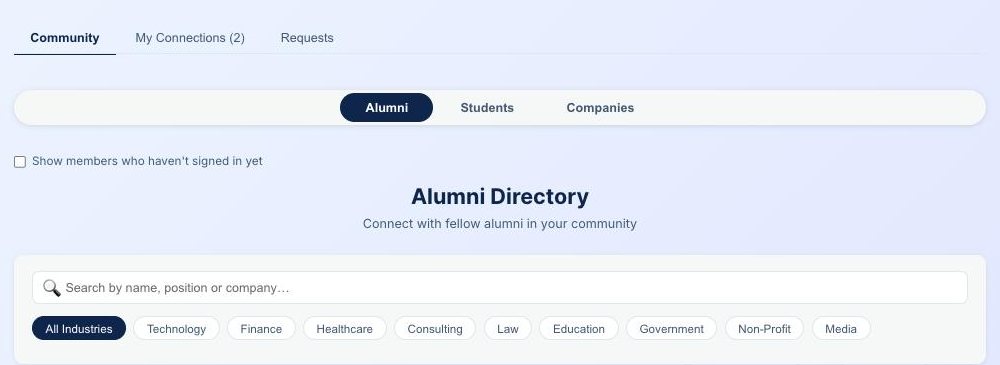
Preloaded profiles, whether alumni or athletes, stay out of the member-facing directory and search until that person completes their first login. Admins keep the full roster with a status on every record.

Members were sending connection requests to people who had never opened the app, then reading the silence as rejection. A profile becomes visible the moment its owner signs in. Nothing for staff to approve.

Requested by Client Admin · Delivered July 28
Alumni directory with the hidden-member control
Member data verification

One question at login beats any import

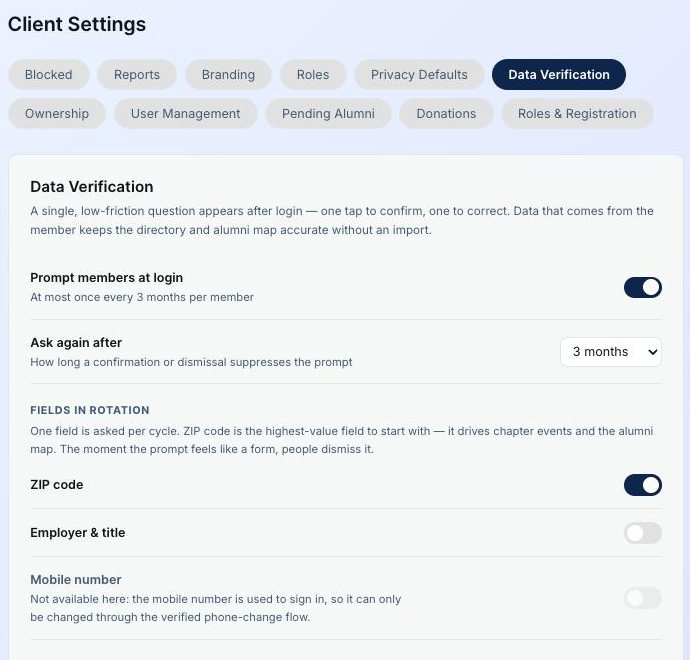
A single low-friction prompt asks a member to confirm or correct one field. One tap to confirm, one to fix. Admins choose which fields rotate through and how often members are asked.

Archived files decay. Asking the member is faster, cheaper and more accurate, and one tap is a low enough price that people answer. This is also the groundwork for the alumni map, which is only as good as the location data underneath it.

Requested by Client Admin · Delivered July 28
Data verification admin settings
The feed

Fix the typo. Keep the RSVPs.

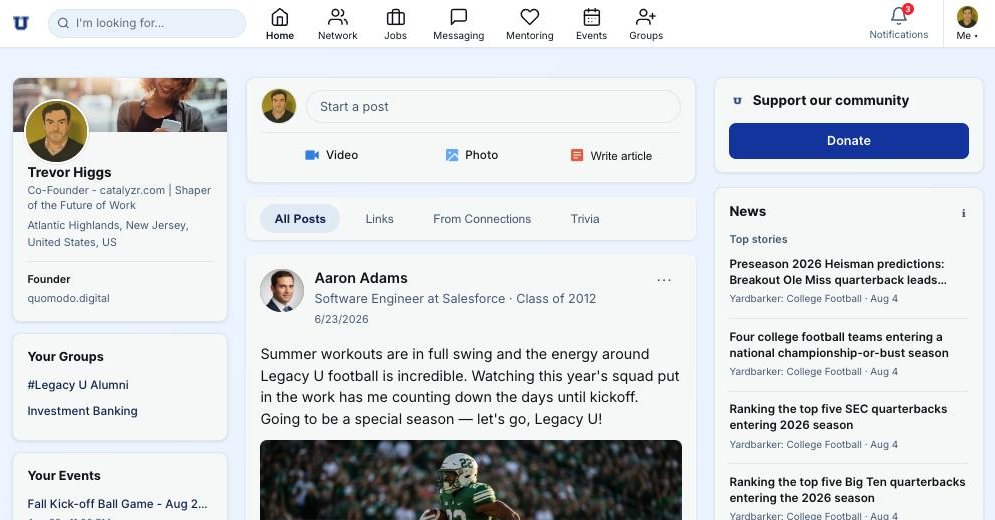
Posts and events can now be corrected in place, so a wrong event date no longer means deleting and reposting and losing every like, comment and RSVP already collected.

Hashtags became live filters in the same release. Tap one and the feed shows every post carrying it, which gives a giving day or a reunion weekend a home without anyone building a page. Links paste in and render their own preview.

Requested by Client Admin · Delivered July 28 and July 29
The Catalyzr Community member feed
Link posts and trivia

Paste a URL. Get something worth looking at.

A link post pulls the image, the headline and the description straight from the page. Nobody formats anything, nobody pastes HTML, and the result looks like it was designed for the feed rather than dropped into it.

Weekly trivia shipped in the same release with its own tab, so a program can run a recurring engagement format without inventing one. Both collect on their own feed tabs, which means a member can browse everything that has been shared without scrolling past it.

Requested by Client Admin · Delivered July 28
A link post rendering a web preview

Also in this release

Broadcast to all members
One message to the entire membership, bypassing the connection gate, with a full send history. Client admins only.
Group messaging
Named groups of connected members, each with a private thread and a private feed. Reunion committees and game-day crews.
Feed tab order
Every member opens on All Posts instead of a feed filtered to connections they may not have yet.
Video athlete profiles
A short video of an athlete, tagged with transferable skills, sitting next to real jobs and real mentors.
School mark on the donate button
The giving control now carries your program's mark in your colors, everywhere it appears.

The platform

What the release sits inside.

This work is not a feature list bolted onto a directory. It lives in a platform that already runs mentoring, jobs, events and interest groups for a program's alumni.

Mentorship module
MentoringAlumni offer topics and capacity. Athletes and recent grads raise their hand.
Events module
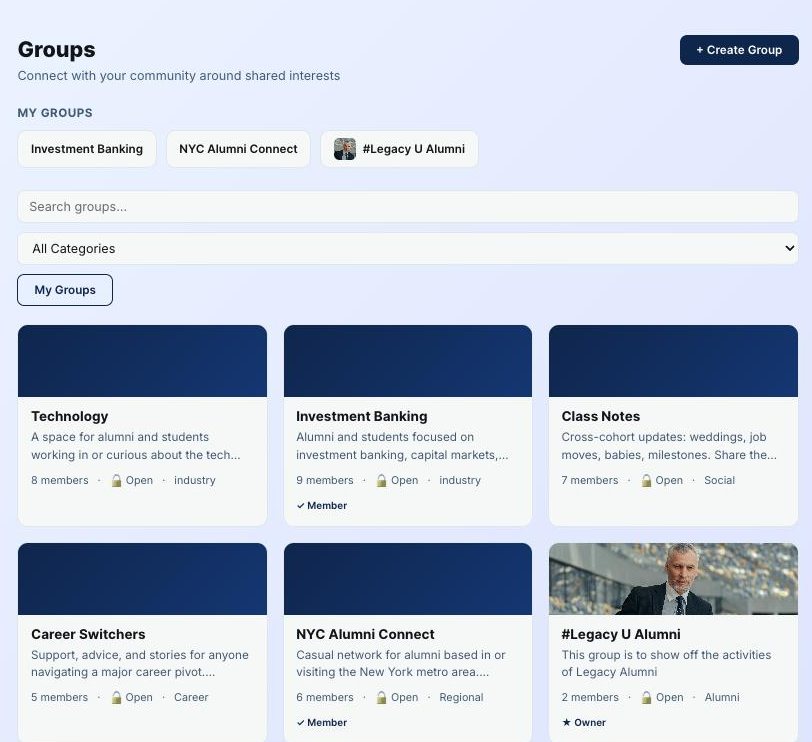
EventsGame days, receptions and watch parties, with registration built in.
Groups module
GroupsInterest and regional groups so the network organises itself.
Jobs board
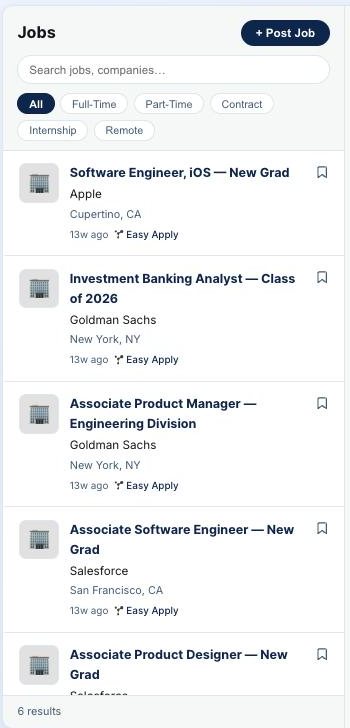
JobsAlumni post real roles. Athletes and alumni apply.

Your program's requests would go on this page too.

Every release starts with someone at a client program saying what is getting in their way. If you want to see how the cycle works from the inside, we will walk you through the current queue, including what we have decided not to build.

Talk to us

Release history

September 2026
Smarter mentorship matching, Google and Outlook calendar coordination, scheduled notifications, private recommendations, stronger preferences and admin controls · read the notes
27 improvements · 6 product areas
August 2026
Nearby Alumni introductions and auto-connect, AI Agents tab, Manager broadcasts, Account settings consolidation, scheduled-post timezone fix · read the notes
9 items · 14 days
July 2026
Scheduling, broadcast, group messaging, directory integrity, feed editing, hashtags, trivia
12 items · 10 days
Next release
The items now moving through client review · see the roadmap
In progress